The agentic OS, and how we built ours
17 min read
In the past eighteen months nearly every company that sells AI to businesses has started calling its product a platform, and a few have reached for a bigger word. Microsoft’s head of Windows said last November that Windows is “evolving into an agentic OS”, and in August Cloudflare shipped a product it simply calls Cloudflare OS.
We use the word too. Our home page says “Not an app. An operating system.” So we owe a few explanations: what we mean by it, why we think the market ended up here, and where our choices differ from everyone else’s.
Why everyone wants to be the OS
The short version is that the model stopped being something one company could own.
The same level of capability gets about ten times cheaper every year, by a16z’s count. Since January, open-weight models have trailed the best closed ones by about four months, according to Epoch AI. And companies already buy from several labs at once: in Menlo Ventures’ December 2025 survey, Anthropic had 40% of enterprise spend on model APIs, OpenAI 27% and Google 21%. Once the model can be swapped, what keeps a customer is everything around it: the context the model gets, the tools it can call, who may do what, and which window people open first thing in the morning.
The wiring between models and tools became common property at about the same time. Anthropic published the Model Context Protocol (MCP) in November 2024, and thirteen months later handed it to the Linux Foundation’s new Agentic AI Foundation, alongside OpenAI’s AGENTS.md. Google’s agent-to-agent protocol, A2A, joined it in August. Anthropic’s format for agent skills became an open standard in December. A tool written once now plugs into most agents, so the competition moved up a floor: to where tools get installed, who governs them, and what people see while they work.
So the stores opened. Salesforce launched AgentExchange in March 2025, OpenAI put apps into ChatGPT that October, Microsoft made Agent 365, its control plane for a company’s agents, generally available in May, and Anthropic’s marketplace opened on September 23 with more than two thousand plugins, agents and services. Systems of record went the other way and put fences round their data. Slack’s API terms have barred bulk export and model training on Slack data since May 2025; SAP’s API policy for 2026 lets AI agents call SAP only through routes SAP has endorsed. Each vendor wants the agent to live with them, next to their model or next to their data.
In the past two months the shapes have started to converge. Cloudflare released Cloudflare OS in August as “an open platform for agents, apps, and work”: an agent workspace with the company’s context and skills, a layer that governs what it can reach, and apps that teams build and share, with models chosen through one gateway, all deployed into the company’s own Cloudflare account. In September Microsoft relaunched Copilot around Autopilot, an agent that “lives in your tenant with its own identity, memory, computer and workspace”, with a plugin catalog IT approves centrally and a setting for “which model families are available to different groups of users”. Ten days earlier Salesforce announced AIforce, which brings its agents and apps into Slack, where “people, agents, apps, and data all come together”, and where “every agent sees only what the person asking can see”. They start from different places and arrive at the same four parts: a place to work, an agent, apps, and rules. Each still anchors them in its own home, whether that’s Microsoft 365, Slack or Cloudflare’s network.
What companies need is a single place to govern all of it. Gartner expects the average Fortune 500 company to run more than 150,000 agents by 2028, and says only 13% of organizations believe they govern agents well enough today. The agents also have to be wired into the work. MIT’s NANDA project reported last year that 95% of the generative AI pilots it studied had no measurable effect on profit and loss. The sample was small and the method has been argued over, but its explanation matches what we see at customers: the tools were bought, and never connected to how the work is actually done. We’re a vendor too, so take this with the right amount of salt, but our bet is that the layer governing a company’s agents shouldn’t belong to whoever sells it the model or keeps its data.
What we mean by an operating system
An operating system does four jobs:
- It knows who is using the machine, and what each program may touch.
- It runs programs it didn’t write, from anyone, without being rebuilt.
- It gives those programs system calls and a screen to draw on, so none of them reinvents files, windows or the network.
- It shares out what’s scarce and keeps the accounts.
The big assistants now do all four, around their own models and in their own cloud. We wanted the same four jobs done around whichever models and data a company already has, on its own servers if it wants.
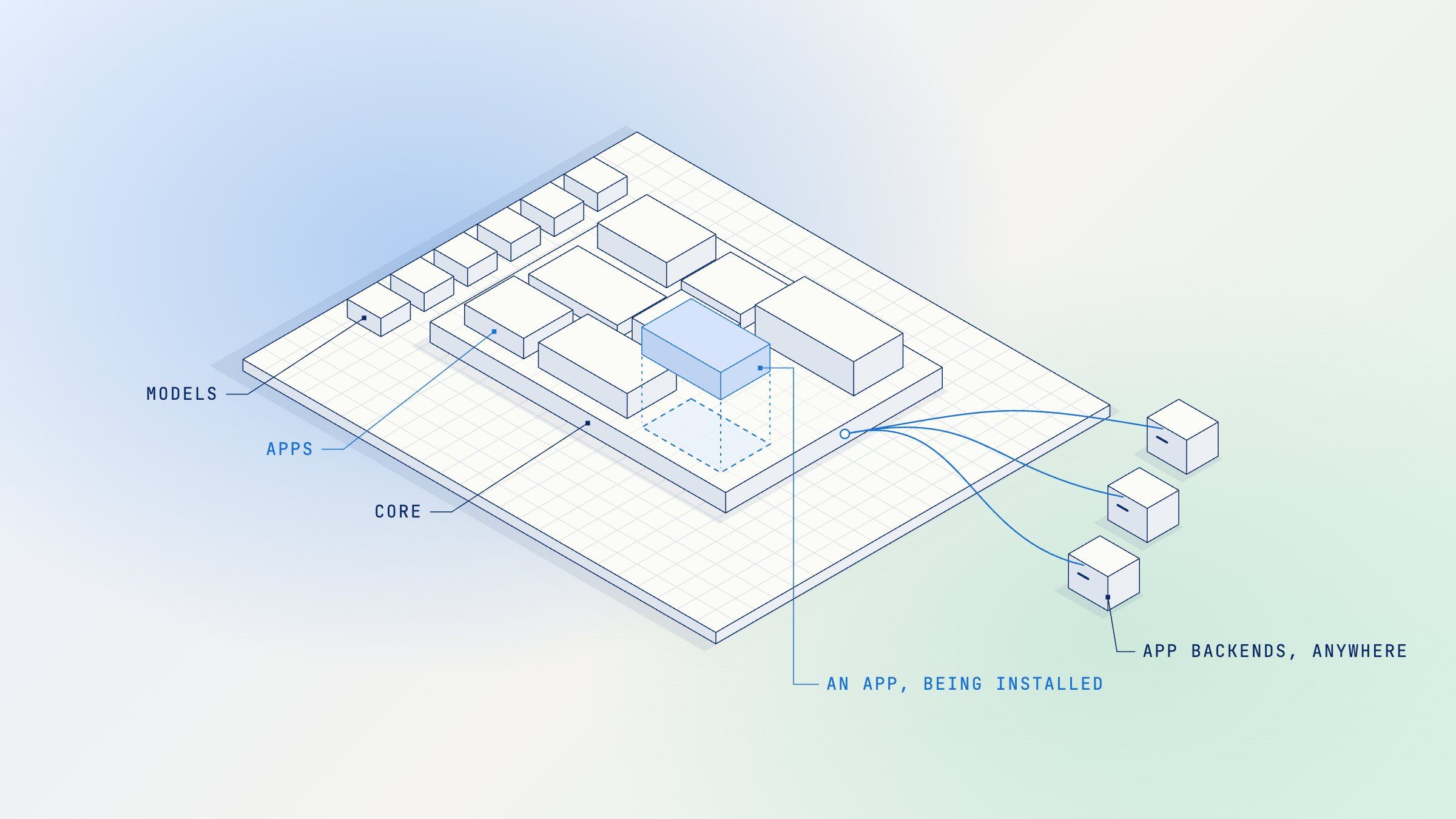
In SotaAgents the kernel is a service we call Core, and the shell is the web, desktop and phone app people work in, which can also sit inside a company’s own portal. Core knows the organization, its workspaces and members, and which apps are installed where. It runs the agent loop, with built-in tools for, among other things, a code sandbox, sub-agents and questions to the user. It gives apps a small set of system calls: files, shared app data, credits (how SotaAgents meters model calls and app work), and finishing a tool call that waited on a person. It keeps the accounts and the audit log. Most of what a department needs beyond that arrives as an app, including things you might expect in the core, like search over company documents or the web. Our architecture notes put the rule in one line: the platform “should grow by adding apps, not by growing the core”.
The choice people ask us about most is that a workspace has one assistant. Nobody builds agents in SotaAgents. People get one assistant whose abilities are the apps installed in their workspace, and when a task needs more hands it starts copies of itself. Most platforms went the other way and gave everyone an agent builder. That’s one road to the sprawl Gartner is forecasting: many agents, each with a separate prompt and separate connections, each reading the rules its own way. We’d rather the abilities multiply behind one agent that already knows the user, the policies and the conversation. (How one assistant keeps dozens of apps’ tools in view without drowning in them was our last post.) A team that wants a different persona, such as a customer-service desk, gets a workspace of its own.
What it changes for a company
Before the machinery, here’s what it’s for. These are sketches of the kind of work customers bring us, each made of pieces the platform has today.
A regulation lands. A compliance officer types /review and asks to compare the new circular with the lending policy, cite every clause that has to change, and flag what needs sign-off. The slash command loads the review method, a skill: a written playbook the agent reads when a task needs one. A document search app finds the company’s policies, a web research app reads the regulation, and a regulation-review app lays the result out in a side panel clause by clause, each change cited to its page. What needs sign-off comes back as a proposal the app holds, and nothing changes until the reviewer approves it.
Numbers that have to be right. A finance reporting app’s backend checks every figure in a report against the tool results it came from and sends back any figure without a source, so the model has to fix it or drop it. Changes to business rules can only be proposed as drafts, and finalizing a report only asks a person to approve it. The model can’t talk its way past any of this, because the checks are code it can’t edit.
A system you already run. An ERP, a claims system, an in-house tool: its app is a small backend next to that system (inside your network, when you run SotaAgents yourself) that calls it with the system’s own credentials. The token each call carries tells the backend which person asked, so it can apply that person’s permissions there. The assistant sees a tool named for the job and never sees the credential.
A person in the loop. When a step needs someone’s choice, such as which account an automation should post from, the tool call pauses, a panel above the input asks, and the same call finishes once they answer.
File types Core doesn’t know. An app can add file types to the chat, such as DWG, DXF or IFC for drawings, with a viewer in the side panel. An engineer selects part of a 3D model and asks about exactly that part.
Put together, that’s one workspace for every approved model, one assistant whose abilities admins install, and existing services connected to the work without moving.
Where it runs, and on which models
A bank’s first question is usually where this runs. SotaAgents runs in our cloud, or on the company’s own servers, with Core, the shell and the apps’ backends inside its network; running it yourself means operating those pieces, which our engineers help with.
Models are the admins’ call, per organization. They pick an allow-list and a default from the frontier labs and open-weight models we route to (the most expensive need a request we approve), and they can bring their own keys for OpenAI, Anthropic, Google or OpenRouter. A company that runs SotaAgents itself can also serve open-weight models from its own GPUs through an OpenAI-compatible server such as vLLM, and they appear in the same picker.
What leaves the network then follows those choices. Pick Claude or GPT and prompts go out to that lab: directly under the company’s own OpenAI, Anthropic or Google key, or through our model router otherwise. Pick an open-weight model on the company’s GPUs and the conversation’s own model calls stay inside; what else goes out depends on how the platform is set up and which apps and tools are on.
An app is a manifest and a web service
An app is a folder with a manifest.yaml, a UI module if it draws anything, and a backend if it needs one. The manifest declares everything the app adds, and the platform exposes nothing that isn’t declared:
- tools, each with a JSON Schema for its input and its output;
- skills: written playbooks the agent reads when a task needs one;
- always-on prompt blocks, which is where an app’s policies go;
- slash commands, pointed at a tool, a skill or a screen;
- screens: pages, result views, side panels, inline renderers;
- events it wants to hear about, data it publishes for other apps, the Core APIs (the system calls above) it wants to use, and the settings an admin fills in.
Here’s a trimmed one, for an app that researches the web. If you don’t read YAML, the figure below it shows the same thing.
# trimmed: the real file also names its publisher, languages, timeouts and screen slots
manifestSchemaVersion: 3
appId: web-research
version: 5.0.2
service: { baseUrl: https://research.internal.example.com }
environments:
  stg: { service: { baseUrl: https://research-stg.internal.example.com } }
contributes:
  tools:
    - name: web.search
      description: Search the public web for current facts. Use web.fetch for exact wording.
      inputSchema: schemas/search.input.json
      outputSchema: schemas/search.output.json
      route: POST /tools/search
  skills:
    - name: research.method
      description: Use for reports and questions that need several sources.
      content: skills/research
  systemPromptInjections:
    - name: citation-format
      staticContent: Cite each web-backed claim with [web:<url>#ref].
  slashCommands:
    - { verb: research, target: { kind: skill, ref: research.method } }
  ui:
    - { kind: nativeModule, surface: tool-view, toolNames: [web.search],
        module: { entry: ui/native.js, export: SearchResult } }
    - { kind: messageRenderer, match: { pattern: "\\[web:([^\\]#]+)#ref\\]" },
        render: { style: citation }, onClick: { invoke: url.open, params: { href: "$1" } } }
The backend is an ordinary web service, written in whatever you already use: TypeScript, Python, Go or Rust, in any framework. Core never hosts it; it calls it over HTTPS. Only Core needs to reach it, not the browser or the wider internet, so when you run SotaAgents yourself it can sit on a private address inside your network. An app that brings only skills, prompts and screens needs no backend at all.
Why not an MCP server, or one of the plugins that bundle several? An MCP server gives the model tools and prompts, and with MCP Apps a framed screen; Claude’s and ChatGPT’s plugins add skills and commands on top. What an app here adds is always-on policy, screens that are part of the product and data other apps can read, all in one versioned unit with a staging copy. Workspaces can still connect MCP servers directly, and an app’s backend can call any it likes.
Apps draw inside the shell
App screens in SotaAgents aren’t put in a frame. They’re React components that run in the shell’s own React tree, using its theme, language and components, in seven kinds of place: a full page, a view of a tool call inside the conversation, a part of a message, a side panel that can be reopened and exported, a card on the assistant’s home, a button beside the input, and a panel above the input that can read and edit the draft.
The industry has settled on three answers to where an app’s screen runs. The first is a sandboxed iframe. MCP Apps, the extension Anthropic and OpenAI agreed on in January, renders an app’s UI from a ui:// resource in a sandboxed frame that talks to the host over postMessage; ChatGPT, Claude and Atlassian’s Custom UI all work this way. The second is a description the host draws: Microsoft’s Adaptive Cards, Google’s A2UI and Atlassian’s UI Kit send a tree of components as data, and the host renders it with its own widgets. The third is code that runs in the host itself: Salesforce’s Lightning components in Agentforce, which it runs behind an isolation layer of its own, and our apps.
Each one gives something up. An iframe is the right default when the host can’t vet the code, because whatever runs inside can’t read the page around it; it’s also why framed apps feel like guests, with their own fonts, their own scrollbars and no way into the host’s panels. A description is safe and looks native, but an app can only draw what the vocabulary has a word for.
Code in the host can draw anything and feel like part of the product. It also runs with the page’s privileges, and we don’t put a layer in between. So the trust moves to how code gets in, and who lets it in. Core serves each deployed build’s UI through a descriptor it signs, and the shell checks the signature and the module’s hash before it imports the module. CSS that isn’t scoped to the app’s own mount fails the build. A module never holds a key to its backend: its calls go through Core, which attaches the user’s authority to that one call. The code in an organization’s shell comes only from apps its admins chose to install, plus the Staging and Development builds a developer sees on their own, and we review an app before it’s first listed in our public App Store. UI from MCP servers that nobody vetted still runs where it belongs, in the MCP Apps sandbox.
Every call says who and where
When the agent calls an app’s tool, or an app’s screen asks its backend for data, the request goes through Core, and Core checks it before anything leaves. The user’s session has to be valid. The app has to be installed for the organization and on in this workspace, and the installed build has to declare this exact tool. The arguments have to fit its schema. A call that fails any of these is refused in Core, and the app never sees it.
Then Core mints a token for that one call: a JWT signed with Ed25519, valid for 60 seconds, addressed to that app alone. It names the organization, the workspace, the installation, the environment, the call’s scope (tool:web.search, say), and the user whenever a person started it. The app checks it against Core’s public keys, published at a well-known URL, and takes identity only from the token; the IDs repeated in the request body are there for its logs. The app holds no SotaAgents secret at all. Core generates the signing keys and rotates them every week.
Calls in the other direction are narrower still. If an app declared that it needs a Core API, such as saving a file into the workspace or holding credits for a long job, the call carries a second token that covers only what the manifest granted, and none is minted for anything else. Work that outlasts the minute swaps it for a token bound to that one job, good for a day at most. When an admin uninstalls the app, or turns it off in a workspace, Core refuses its tokens there from that moment, day-long job tokens included, and switching it back on starts a new generation, so old tokens never come back. A tool-call token already sent stays valid to the app for the rest of its minute.
We modelled this on Atlassian’s Forge, whose remote backends verify a short-lived invocation token in much the same way. A typical MCP connector presents an OAuth token or an API key that the host stores for you. An OAuth token can say which user; neither it nor a shared key says which workspace a call came from or which tool the model chose. Ours says all of that, signed. (An app that needs a person’s own account in another system still asks for it with OAuth, and keeps that token itself.) For a company, the difference shows up in an audit: every call an app received names one organization and one workspace, and the person behind it when there was one, and the app could reach into SotaAgents only as far as its manifest declared.
Three environments, one build
Every app has three environments: a developer’s own, a shared Staging, and Production. App platforms have worked this way for years: Forge has development, staging and production, and Salesforce and Microsoft’s Power Platform keep them apart too. We think agent extensions need it more, because part of what an app ships is instructions to the model. A tool’s description tells the model when and how to use it. With a remote MCP server added by URL, that description is whatever its owner deployed a minute ago, and a change reaches every connected workspace at once, which is also how the tool-poisoning attacks Simon Willison wrote about get in.
A developer works in a Development session. sota dev connects a real workspace to their laptop through a tunnel. Only the app’s owner and contributors who are members of that workspace can start one, nobody else sees it, and a change to the UI or the manifest shows up on the next message. If the laptop is down, calls fail rather than fall through to a deployed build.
sota deploy turns the app into an immutable build and puts it on Staging, one shared copy that only the app’s contributors can reach, with its own data and real credits. Core doesn’t take the CLI’s word for what the manifest means: it compiles it again, hashes the result, and compares the build’s privileges with Production’s, looking for new Core APIs, new outside origins, new data it reads or publishes. The developer has to acknowledge a breaking change before Staging takes it. sota release then promotes those exact bytes to Production, and nothing is rebuilt.
Every token names its environment, and so does everything an app keeps in Core, so Staging never reads what Production keeps there. Each environment can point at a backend of its own, named in the manifest.
A release still reaches every workspace that has the app, at once. What it can’t do is change quietly: an app’s tool names, descriptions and schemas change only through a release, a versioned, hashed build that went through Staging first. The backend behind it can change at any time, which is one reason tool results pass through the output guardrails.
The admin draws the borders
Models are covered above. The rest of the controls belong to the organization’s admins, and some to each workspace’s.
- Apps and tools. An app is installed for the organization and is on in every workspace unless a workspace admin turns it off there. MCP servers are added per workspace, and each of their tools can be switched off.
- Guardrails. A dozen guards, from jailbreak and prompt-injection detection to masking personal data, set per workspace to observe, redact or enforce, separately for what people type and for what tools bring back. Jailbreak and secret detection also run at the platform level, on by default, whatever the workspace sets.
- Spend. Credits are held before work and settled after, including by apps that meter their own work. Admins can cap each person’s use over a rolling five hours and set alerts per workspace.
- Access. Sign-in through the company’s identity provider over OIDC or SAML, which can be enforced; IP allow-lists; an audit log of who did what, exportable to CSV.
- Reach. The assistant can be embedded in an intranet or customer portal behind the company’s own sign-in, or put on a public site with a pinned model, a fixed set of apps and a budget of its own.
Side by side
Here’s how the large platforms compare on the questions this post keeps coming back to.
| Platform | Models | Where it runs | What an extension adds | An extension's screens | An extension's backend |
|---|---|---|---|---|---|
| ChatGPT Enterprise | OpenAI's | OpenAI's cloud, with data kept in one of about ten regions | Plugins: MCP tools, skills, screens, side panels, settings pages | MCP Apps in a sandboxed iframe, plus OpenAI's own extras | Any public HTTPS MCP server, in any language |
| Claude Enterprise | Anthropic's | Anthropic's cloud | Plugins: MCP connectors, skills, slash commands, hooks, sub-agents; an admin can make one required | MCP Apps in a sandboxed iframe | Any remote MCP server; a private one through a tunnel (in preview) |
| Microsoft 365 Copilot | OpenAI's, and Anthropic's in Researcher and Copilot Studio; the Foundry catalog for custom engine agents | Microsoft's cloud, including its government clouds | Declarative agents: instructions, knowledge, and actions as API or MCP plugins | Adaptive Cards that the host draws; MCP Apps in part | Any HTTPS API or MCP server |
| Gemini Enterprise | Gemini for the assistant; agents built with Google's kit can call others | Google Cloud | Agents (built in code, over A2A, or without code) and MCP connectors | A2UI: a tree of components that the host draws | Google's agent runtime, or any A2A endpoint (in preview) |
| Agentforce | Several labs' models, or your own through BYOLLM | Salesforce's cloud | Actions from Apex, Flow and prompt templates, grouped into topics; MCP tools | Lightning components in the agent's reply | Apex and Flow inside the org; outside services through named credentials |
| Atlassian Rovo | Several labs' models, and open-weight models that Atlassian hosts | Atlassian's cloud | Agents and actions, as Forge app modules | UI Kit components the host draws, or Custom UI in a sandboxed iframe | Atlassian-hosted functions, or your own service, verified with a signed token |
| Mistral Vibe | Mistral's own | Mistral's cloud, your cloud, or your own servers | MCP connectors, and skills kept in Mistral Studio | A Canvas for documents and reports | Any HTTPS MCP server |
| Cloudflare OS | Whichever models the company allows in Cloudflare's AI Gateway | The company's own Cloudflare account; open source | Apps the agent writes and teams share; Gatekeepers to outside services; MCP | App screens in a sandboxed frame | A Dynamic Worker on Cloudflare, with its own SQLite |
| SotaAgents | Claude, GPT, Gemini and open-weight models, on our keys or yours; your own GPUs when you run it yourself | Our cloud, or your own servers | Tools, skills, always-on prompts, slash commands, screens, events, shared data, admin settings | React components in the shell's own tree | Any HTTPS service in any language, wherever Core can reach it |
Each column has a vendor who matches us on it, though not all of them fit in the table. Atlassian’s Forge checks its backends with a short-lived signed token, as we do. Glean, Dust and Agentforce let an admin choose among several labs’ models. Mistral and Cohere will run their assistants inside a customer’s network, with their own models. Claude’s plugins bundle tools, skills, commands and hooks much as our manifest does. Cloudflare OS is the closest in spirit: open source, run in the company’s own Cloudflare account, with models chosen behind one gateway. Its apps are written by the agent and run on Cloudflare’s runtime, their screens in a sandboxed frame; ours are built by developers in any stack, can run on the company’s own servers, and draw inside the shell. What we haven’t found elsewhere is all of it together: models from several labs or from your own GPUs, a backend that can live inside your network, screens that are part of the product, and a platform a customer can run on its own servers.
It has a price. Running SotaAgents yourself means operating Core, the shell and any GPUs. The manifest and the UI modules are written for SotaAgents, and the modules follow the shell’s React and component versions; only the backend would move with you to another platform. Our catalog is a fraction of a marketplace with thousands of listings, because most apps are built for one company, by its own developers or ours. Code that runs in the shell makes review matter more, ours before a public listing and the admin’s before an install, where a frame would have limited the damage. Every call also takes a hop through Core, which is what one place that checks everything costs.
What’s next
- Approvals in the platform. Today an app that changes things builds confirmation into its own tools: a preview that returns a token, and an apply that needs it. We want an approval step any tool can ask for.
- Profiles below the organization. Model choices per workspace and per project, beneath the organization’s allow-list.
- Clean exits. Export and erase callbacks, so an app hands over or deletes its data when it’s uninstalled.
- A shorter path. A direct route from an app’s screen to its backend for apps that need the speed, with the same kind of token.
If you’re deciding where your company’s agents should live, we’d be glad to talk it through.